27강 - 스크롤바 overlay
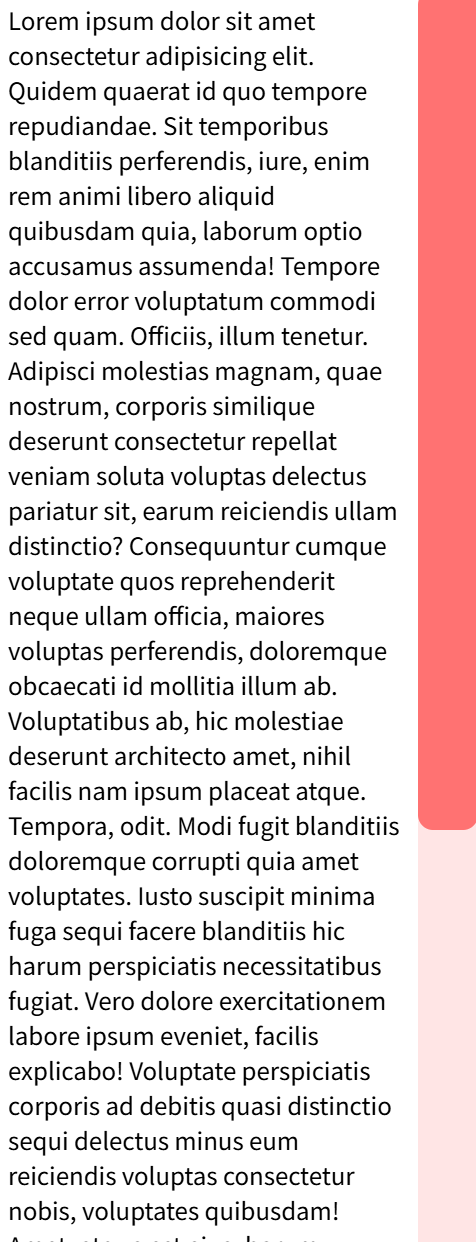
[html]
[Lorem*20]
[css]
/* 스크롤바 꾸미기 시작 */
:root {
overflow-y:overlay;
}
::-webkit-scrollbar-thumb {
background-color: rgba(255, 0, 0, .5);
border-radius: 10px;
cursor:pointer;
}
::-webkit-scrollbar {
width: 40px;
height: 40px;
background-color: rgba(255, 0, 0, .1);
}
/* 스크롤바 꾸미기 끝 */
[js]
동영상
28강 - 텍스트에 외곽선 효과

[html]
<!-- 테일윈드 -->
<link rel="stylesheet" href="https://cdnjs.cloudflare.com/ajax/libs/tailwindcss/2.2.19/tailwind.min.css">
<section class="section section-1 relative">
<div class="absolute inset-0 flex items-center justify-center whitespace-nowrap border-text text-12 select-none">
Lorem ipsum dolor
<br>
amet consectetur
</div>
<div class="absolute inset-0 flex items-center justify-center whitespace-nowrap text-7 mt-10 select-none">
Exercitationem
<br>
voluptas nemo
</div>
</section>
[css]
/* 폰트 */
@font-face {
font-family: 'Pretendard-Regular';
src: url('https://fastly.jsdelivr.net/gh/Project-Noonnu/noonfonts_2107@1.1/Pretendard-Regular.woff') format('woff');
font-weight: 400;
font-style: normal;
}
html > body,
html > body input,
html > body button,
html > body textarea {
font-family: 'Pretendard-Regular';
}
.section-1 {
min-height: 100vh;
}
.text-12 {
font-size: 12rem;
line-height: 1;
}
.text-7 {
font-size: 7rem;
line-height: 1;
}
.border-text {
--border-width: 2px;
--color: rgba(0, 0, 0, 0.5);
color: white;
text-shadow:
calc(var(--border-width) * -1) 0 0 var(--color),
calc(var(--border-width) * 1) 0 0 var(--color),
0 calc(var(--border-width) * -1) 0 var(--color),
0 calc(var(--border-width) * 1) 0 var(--color);
}
[js]
동영상
29강 - 텍스트 외곽선 마우스 움직임 효과
[html]
<!-- 테일윈드 -->
<link rel="stylesheet" href="https://cdnjs.cloudflare.com/ajax/libs/tailwindcss/2.2.19/tailwind.min.css">
<script src="https://cdnjs.cloudflare.com/ajax/libs/jquery/3.6.0/jquery.min.js"></script>
<script src="https://cdnjs.cloudflare.com/ajax/libs/lodash.js/4.17.21/lodash.min.js"></script>
<section class="section section-1 relative overflow-hidden">
<div class="absolute inset-0 flex items-center justify-center whitespace-nowrap border-text text-12 select-none mousemove-effect-1-el" data-mousemove-effect1-hor-res="0.01" data-mousemove-effect1-ver-res="0.01">
Lorem ipsum dolor
<br>
amet consectetur
</div>
<div class="absolute inset-0 flex items-center justify-center whitespace-nowrap text-7 mt-10 select-none mousemove-effect-1-el" data-mousemove-effect1-hor-res="-0.01" data-mousemove-effect1-ver-res="-0.01">
Exercitationem
<br>
voluptas nemo
</div>
</section>
[css]
/* 폰트 */
@font-face {
font-family: 'Pretendard-Regular';
src: url('https://fastly.jsdelivr.net/gh/Project-Noonnu/noonfonts_2107@1.1/Pretendard-Regular.woff') format('woff');
font-weight: 400;
font-style: normal;
}
html > body,
html > body input,
html > body button,
html > body textarea {
font-family: 'Pretendard-Regular';
}
.section-1 {
min-height: 100vh;
}
.text-12 {
font-size: 12rem;
line-height: 1;
}
.text-7 {
font-size: 7rem;
line-height: 1;
}
.border-text {
--border-width: 2px;
--color: rgba(0, 0, 0, 0.5);
color: white;
text-shadow:
calc(var(--border-width) * -1) 0 0 var(--color),
calc(var(--border-width) * 1) 0 0 var(--color),
0 calc(var(--border-width) * -1) 0 var(--color),
0 calc(var(--border-width) * 1) 0 var(--color);
}
[js]
function MousemoveEffect1__start() {
const $window = $(window);
let windowWidth = $window.width();
let windowHeight = $window.height();
$window.resize(_.throttle(function () {
windowWidth = $window.width();
windowHeight = $window.height();
}, 100));
$window.resize(_.throttle(function () {
MousemoveEffect1__update();
}, 100));
let MousemoveEffect1__$el = null;
let MousemoveEffect1__lastPosX = 0;
let MousemoveEffect1__lastPosY = 0;
function MousemoveEffect1__update() {
MousemoveEffect1__$el.each(function (index, node) {
const $node = $(node);
const horRes = $node.data('data-mousemove-effect1-hor-res');
const verRes = $node.data('data-mousemove-effect1-ver-res');
const x = (MousemoveEffect1__lastPosX - (windowWidth / 2)) * horRes;
const y = (MousemoveEffect1__lastPosY - (windowHeight / 2)) * verRes;
$(node).css('transform', 'translateX(' + x + 'px) translateY(' + y + 'px)');
console.log("MousemoveEffect1__lastPosX : " + MousemoveEffect1__lastPosX);
console.log("MousemoveEffect1__lastPosY : " + MousemoveEffect1__lastPosY);
});
}
function MousemoveEffect1__init() {
MousemoveEffect1__$el = $('.mousemove-effect-1-el');
MousemoveEffect1__$el.each(function (index, node) {
const $node = $(node);
$node.data('data-mousemove-effect1-hor-res', $node.attr('data-mousemove-effect1-hor-res') * 1);
$node.data('data-mousemove-effect1-ver-res', $node.attr('data-mousemove-effect1-ver-res') * 1);
});
const MousemoveEffect1__updateThrottled = _.throttle(function () {
MousemoveEffect1__update();
}, 10);
$window.mousemove(function (e) {
MousemoveEffect1__lastPosX = e.clientX;
MousemoveEffect1__lastPosY = e.clientY;
MousemoveEffect1__updateThrottled();
});
}
MousemoveEffect1__init();
}
MousemoveEffect1__start();
동영상
'코딩 > 수업메모' 카테고리의 다른 글
| Git, GitHub 기초 (0) | 2026.03.18 |
|---|---|
| 깃 명령어 정리 (0) | 2026.03.18 |
| HTML, CSS, JS 활용 - 24 ~26 강 (0) | 2026.03.16 |
| HTML, CSS, JS 활용 - 20 ~ 23강 (1) | 2026.03.13 |
| HTML, CSS, JS 활용 - 15 ~ 19강 (0) | 2026.03.12 |