1강
관련 링크
개념

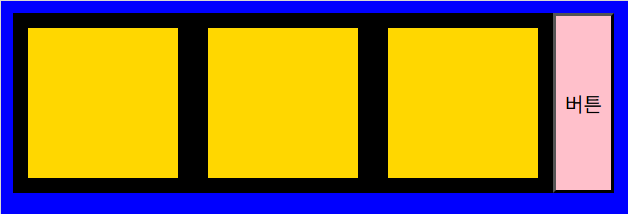
[HTML]
<!-- 제이쿼리 불러오기 -->
<script src="https://cdnjs.cloudflare.com/ajax/libs/jquery/3.6.1/jquery.min.js"></script>
<div></div>
<div></div>
<div></div>
<button>버튼</button>
[CSS]
body {
display: flex;
}
body > div {
width: 100px;
height: 100px;
border: 10px solid black;
}
[JS]
function hello() {
$('div').css('background-color', 'gold');
$('body').css('background-color', 'blue');
$('button').css('background-color', 'pink');
}
function hello2() {
$('div').css('background-color', '');
$('body').css('background-color', '');
$('button').css('background-color', '');
}
// $('button').click(hello);
// $('button').dblclick(hello);
$('button').mouseenter(hello);
$('button').mouseleave(hello2);
문제
문제 - 버튼을 누르면 div 700개의 배경색을 파란색으로 변경해주세요.(제이쿼리 사용)
문제 - 처음 버튼은 body 엘리먼트의 배경을 red로, 두번째 버튼은 body 엘리먼트의 배경을 blue로 변경시켜야 합니다.
문제 - 짝수번째 버튼은 body 엘리먼트의 배경을 red로, 홀수번째 버튼은 body 엘리먼트의 배경을 blue로 변경시켜야 합니다.
동영상
2강
문제 - 클릭할때 마다 배경색 변경, no 변수로 구분

/*
1단계 : console.clear();
2단계 : 제이쿼리 불러오기
3단계 : 버튼 => changeBodyBackground() => console 실행됨 메세지
4단계 : changeBodyBackground() => 배경색 red
5단계 : no 변수 생성, 초기값 0, changeBodyBackground() => no 값 출력
6단계 : changeBodyBackground() => no 값 증가
7단계 : changeBodyBackground() => 배경색 변경
*/
[HTML]
<!-- 제이쿼리-->
<script src="https://cdnjs.cloudflare.com/ajax/libs/jquery/3.6.1/jquery.min.js"></script>
<button onclick="changeBodyBackground();">버튼</button>

[JS]
console.clear();
let no = 0;
function changeBodyBackground() {
console.log("no : " + no);
if ( no % 2 == 0 ) {
$('body').css('background-color', 'red');
}
else {
$('body').css('background-color', '');
}
no++; // no += 1; // no = no + 1;
}
* no % 2 == 0 식: 짝수인지 확인하는 조건식
| 4 | 0 | true | 짝수 |
| 6 | 0 | true | 짝수 |
| 5 | 1 | false | 홀수 |
| 7 | 1 | false | 홀수 |
동영상
2602, JS, jQuery, 클릭할때 마다 배경색 변경, no 변수로 구분
3강
문제 - 클릭할때 마다 배경색 변경, isRed 변수로 구분


// 단계
/*
1단계 : console.clear();[]
2단계 : 제이쿼리 불러오기[]
3단계 : 버튼 => changeBodyBackground() => console 실행됨 메세지[]
4단계 : changeBodyBackground() => 배경색 red[]
5단계 : isRed 변수 생성, 초기값 false, changeBodyBackground() => isRed 값 출력[]
6단계 : changeBodyBackground() => isRed 값이 변경[]
7단계 : changeBodyBackground() => 배경색 변경[]
*/
[HTML]
<!-- 제이쿼리-->
<script src="https://cdnjs.cloudflare.com/ajax/libs/jquery/3.6.1/jquery.min.js"></script>
<button onclick="changeBodyBackground();">버튼</button>
[JS]
console.clear();
let isRed = false;
function changeBodyBackground() {
console.log("isRed: " + isRed);
if ( isRed) {
$('body').css('background-color', 'red');
}
else {
$('body').css('background-color', '');
}
isRed = !isRed;
}
동영상
2602, JS, jQuery, 클릭할때 마다 배경색 변경, isRed 변수로 구분
4강
문제

[HTML]
<script src="https://cdnjs.cloudflare.com/ajax/libs/jquery/3.6.0/jquery.min.js"></script>
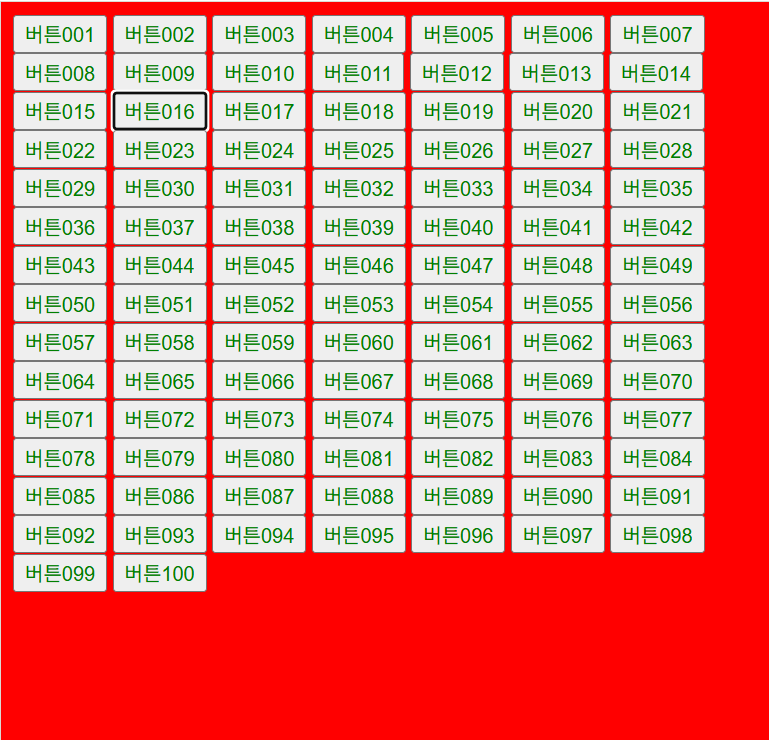
<button>버튼001</button>
.
.
.
<button>버튼100</button>
[JS]
console.clear();
let isRed = false;
function changeBodyBackground() {
console.log("isRed : " + isRed);
if ( isRed ) {
$('body').css('background-color', '');
}
else {
$('body').css('background-color', 'red');
}
isRed = !isRed;
}
$('button').css('color', 'green');
// 버튼에 클릭 이벤트를 건다.
// 버튼이 클릭되면, changeBodyBackground 함수가 실행된다.
$('button').click(changeBodyBackground);
동영상
2602, JS, jQuery, 어떤 버튼을 눌러도 배경색이 바뀌도록
5강 - addClass, removeClass
문제
문제 - removeClass로 배경색이 원래대로 회복

[HTML]
<!-- 제이쿼리-->
<script src="https://cdnjs.cloudflare.com/ajax/libs/jquery/3.7.1/jquery.min.js"></script>
<button class="btn-1">배경색 변경</button>
<button class="btn-2">배경색 회복</button>
[CSS]
body.active {
background-color: green;

}
[JS]
console.clear();
$('.btn-1').click(function(){
$('body').addClass('active');
})
$('.btn-2').click(function(){
$('body').removeClass('active');
})
동영상
2602, JS, jQuery, addClass로 배경색 변경, removeClass로 회복
6강 - hasClass
문제
문제 - 버튼 하나로 배경색이 계속 바뀜, hasClass

[HTML]
<!-- 제이쿼리-->
<script src="https://cdnjs.cloudflare.com/ajax/libs/jquery/3.7.1/jquery.min.js"></script>
<button class="btn">배경색 변경/회복</button>
[CSS]
body.active {
background-color:red;
}

[JS]
console.clear();
$('.btn').click(function() {
let has = $('body').hasClass('active');
if ( has ) {
$('body').removeClass('active');
}
els {
$('body').addClass('active');
}
});
동영상
2602, JS, jQuery, 버튼 하나로 배경색이 계속 바뀜, hasClass
7강 - 제이쿼리로 스타일을 직접 조종하면 안되고, addClass 를 이용해야 하는 이유
v1, v2 구분
| 애니메이션 처리 | JS(jQuery animate) | CSS transition |
| 딜레이 처리 | setTimeout | transition delay |
| 코드 길이 | 김 | 짧음 |
| 유지보수 | 불리 | 유리 |
| 성능 | 비교적 무거움 | 더 부드러움 |

[HTML]
<script src="https://cdnjs.cloudflare.com/ajax/libs/jquery/3.6.0/jquery.min.js"></script>
<img src="https://picsum.photos/id/237/800/300" alt="">
<img src="https://picsum.photos/id/238/800/300" alt="">
<img src="https://picsum.photos/id/239/800/300" alt="">
[CSS]
body {
margin:0;
background-color:red;
min-height:100vh;
}
img {
display:block;
width:100%;
}
img {
margin-left:-100%;
}
[JS]
$('body').mouseenter(function() {
$('img:nth-of-type(1)').animate({'margin-left' : '0'}, 300);
setTimeout(function() {
$('img:nth-of-type(2)').animate({'margin-left' : '0'}, 300);
}, 300);
setTimeout(function() {
$('img:nth-of-type(3)').animate({'margin-left' : '0'}, 300);
}, 600);
})
[HTML]
<script src="https://cdnjs.cloudflare.com/ajax/libs/jquery/3.6.0/jquery.min.js"></script>
<img src="https://picsum.photos/id/237/800/300" alt="">
<img src="https://picsum.photos/id/238/800/300" alt="">
<img src="https://picsum.photos/id/239/800/300" alt="">
[CSS]
body {
margin:0;
background-color:red;
min-height:100vh;
}
img {
display:block;
width:100%;
}
img {
margin-left:-100%;
transition: margin-left 0.3s;
}
img:nth-of-type(2) {
transition: margin-left 0.3s 0.3s;
}
img:nth-of-type(3) {
transition: margin-left 0.3s 0.6s;
}
body.active > img {
margin-left:0;
}
[JS]
$('body').mouseenter(function() {
$('body').addClass('active');
})
동영상
2602, JS, jQuery, 제이쿼리로 스타일을 직접 조종하면 안되는 이유, animate, setTimeout
'코딩 > 수업메모' 카테고리의 다른 글
| JQ 13~21강 개념 - 제이쿼리 (0) | 2026.02.27 |
|---|---|
| JQ 8~12강 개념 - 제이쿼리 (0) | 2026.02.26 |
| JS 바닐라 자바스크립트 (0) | 2026.02.25 |
| JS 9~12강 개념 - 함수(매개변수, 리턴, 배열) (0) | 2026.02.24 |
| JS 변수명, 함수명 잘 짓는 법 (0) | 2026.02.24 |